As part of your Health Access Solutions membership, your prescription service includes access to several tools and resources to help you find affordable medications. One of those resources is Drexi, a pharmacy benefit manager with a network of over 65,000 pharmacies nationwide and tools to help you compare prices, locate medications, and explore lower-cost options. To access this network, you have been provided with a prescription card to use when ordering or picking up medication at a pharmacy.
Always Use the Latest Version of Your Prescription Card
Before heading to the pharmacy, make sure you’re using the current version of your prescription card. Prescription card details may change from time to time, and using an outdated card is one of the most common reasons members run into issues at the pharmacy.
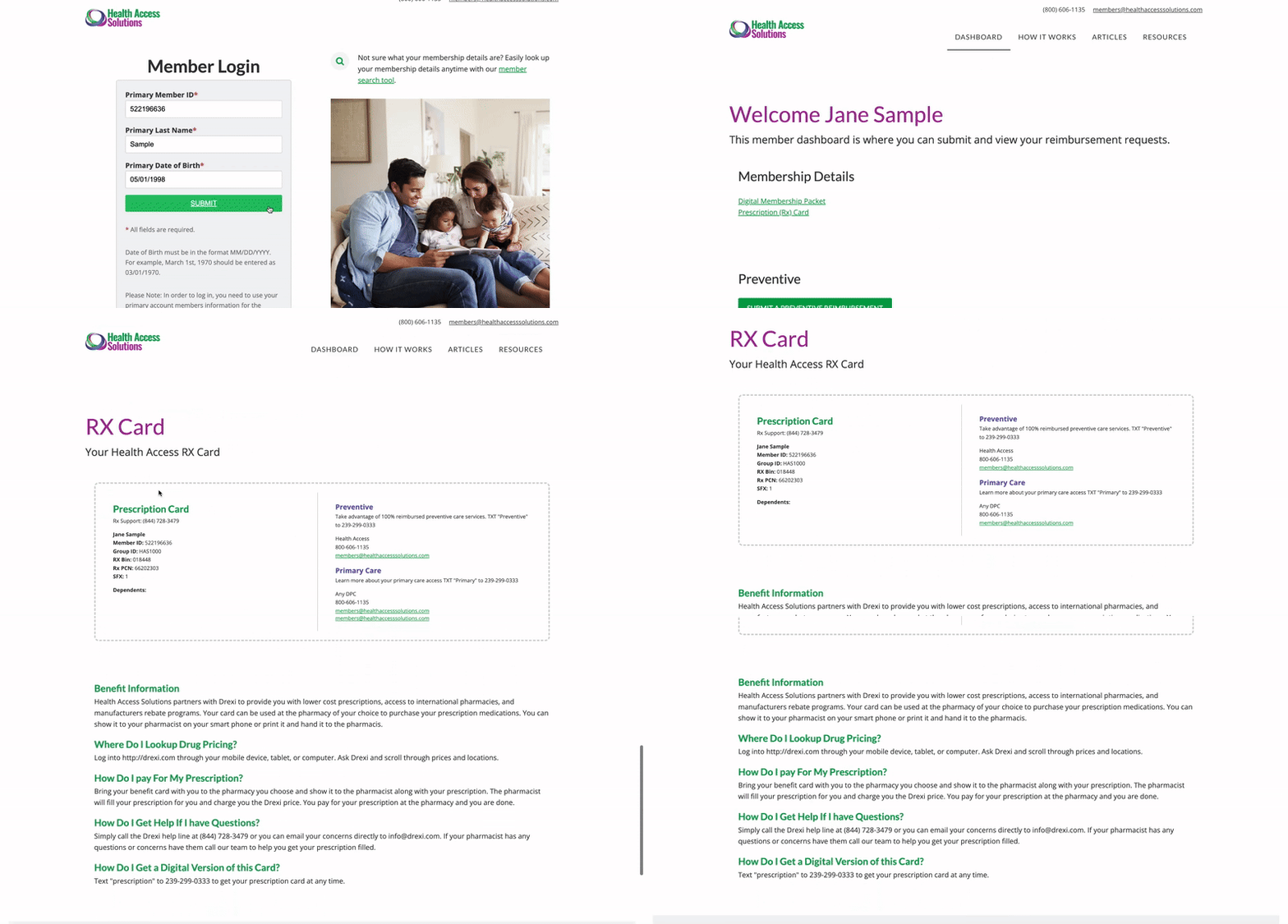
If your card isn’t working, it’s likely the information has been updated and you are using an outdated version. To get the most up-to-date version of your card, simply log in to your Member Dashboard and navigate to the link labelled “Prescription (RX) Card.”
Get Support
If you’re still having trouble—or if you have other questions about how to use your prescription service, call the support number for Drexi listed on your prescription card.
If you have other questions about your membership or need help with the new login process, our member support team is ready to assist you. You can reach a helpful member of our team at members@healthaccesssolutions.com or (800) 606-1135.